JSON Editor
The JSON Editor is DeepSnap’s workshop for shaping data. Bring in free-form JSON, validate it, edit it with confidence, and turn good samples into starter C# without leaving Unity.
Why a JSON workspace belongs next to snapshots
Snapshots freeze Unity objects. Real projects also live in JSON: configs, exports, API samples, hand-authored tables. The JSON Editor closes that gap. You get a multi-document workspace designed for the same people who already care about structure, validation, and clean C# models.
Use it when you need to:
- Clean a messy export before it becomes production data
- Inspect and tweak JSON that mirrors Unity-serialized shapes
- Generate a first-pass C# class from a real sample
- Keep several related documents open while you iterate
Work across documents, not one fragile buffer
Open multiple tabs, import .json files, and let DeepSnap restore session state between Editor sessions. Create untitled documents when you are sketching. Rename and close tabs as the work settles.
Formatting tools help you stay readable: pretty indent, structure-aware smart format, compact minify, and key sorting when order is getting in the way. Validate when you want a strict pass. Turn on live validation in Preferences if you prefer continuous feedback while typing.
Inspector
When JSON is valid, the right pane becomes a live Inspector bound to the document. Change values in place, grow or shrink arrays, reorder where supported, and choose types for null placeholders. Edits flow back into the code pane with undo coalescing, so the text and the form stay honest with each other.
If the JSON breaks, the Inspector steps aside and the Problems list takes over. Fix the syntax, and the tools return.
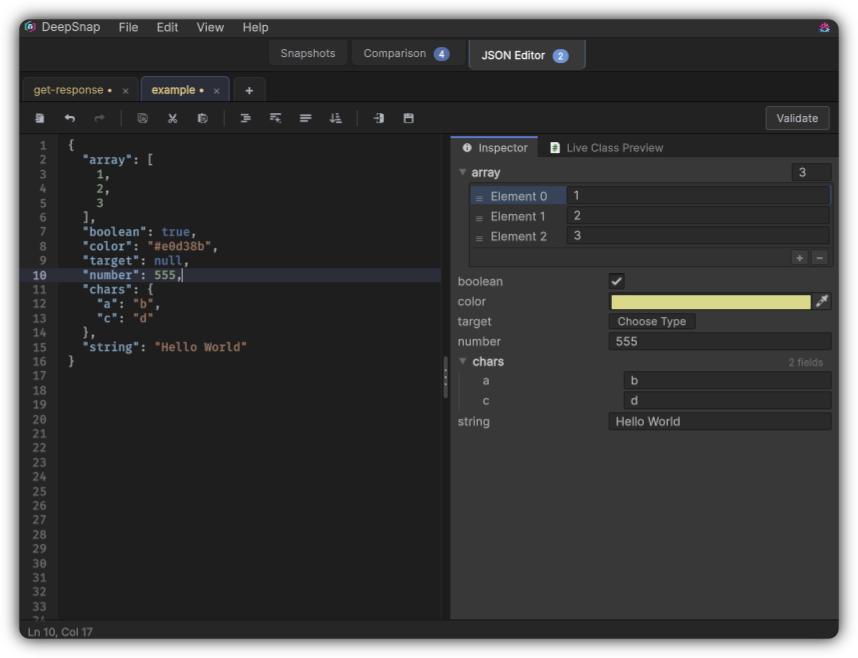
Inspector: edit valid JSON like a form while the code pane stays in sync.
Live Class Preview
Live Class Preview watches valid JSON and generates read-only C# classes you can copy into your project. It is built for momentum: sketch the data shape, preview the model, copy the code, then refine in your scripts.
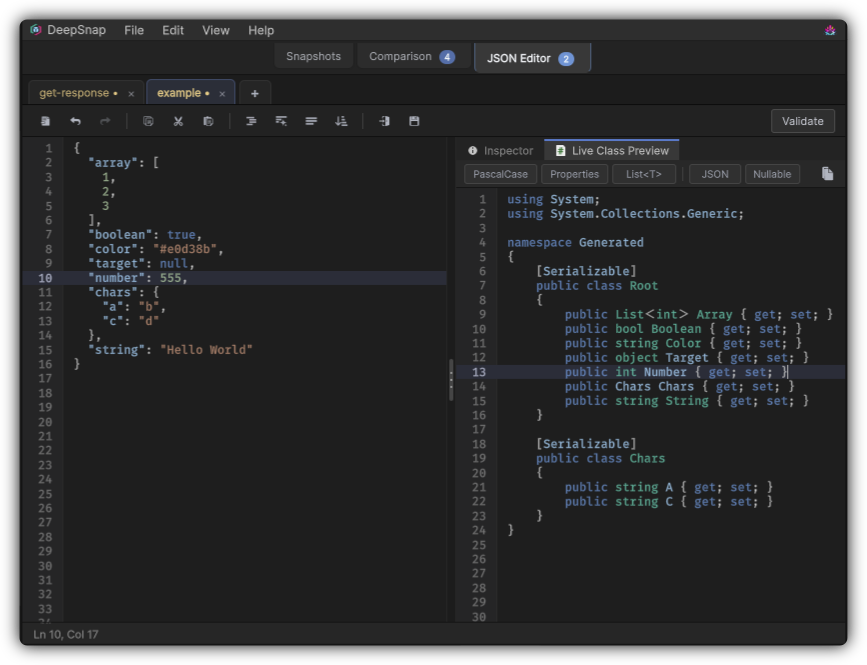
Live Class Preview: starter C# that matches the shape of your JSON.
Toolbar chips keep generation choices close:
| Choice | What it controls |
|---|---|
| PascalCase / camelCase | Member naming style |
| Properties / Fields | { get; set; } versus fields |
| List<T> / T[] | How arrays are typed |
| JSON | Whether to emit [JsonProperty("…")] |
| Nullable | Prefer nullable annotations where appropriate |
Defaults for namespace, usings, root class name, [Serializable], and live preview live in Preferences → C# Editor. Keyword keys become valid identifiers such as @string or @object, with property mappings when attributes are on.
A practical loop
- Export or copy JSON from a snapshot when you want Unity-shaped data as a starting point.
- Import or paste it into the JSON Editor.
- Validate and tidy the document.
- Adjust values in the Inspector or the code pane.
- Copy C# from Live Class Preview and continue in your project.
That loop is the product value: less hand-transcription, fewer shape mistakes, faster paths from real data to real code.
Tune behavior in Preferences. Learn how snapshot envelopes differ from free-form JSON in File formats.